Quick Insights:
- Problem: A visually impaired friend wanted to learn basic drumming patterns, but most browser drum machines rely on visual pads, tiny controls and mouse interaction. Screen readers either ignore key controls or give very little feedback while playing.
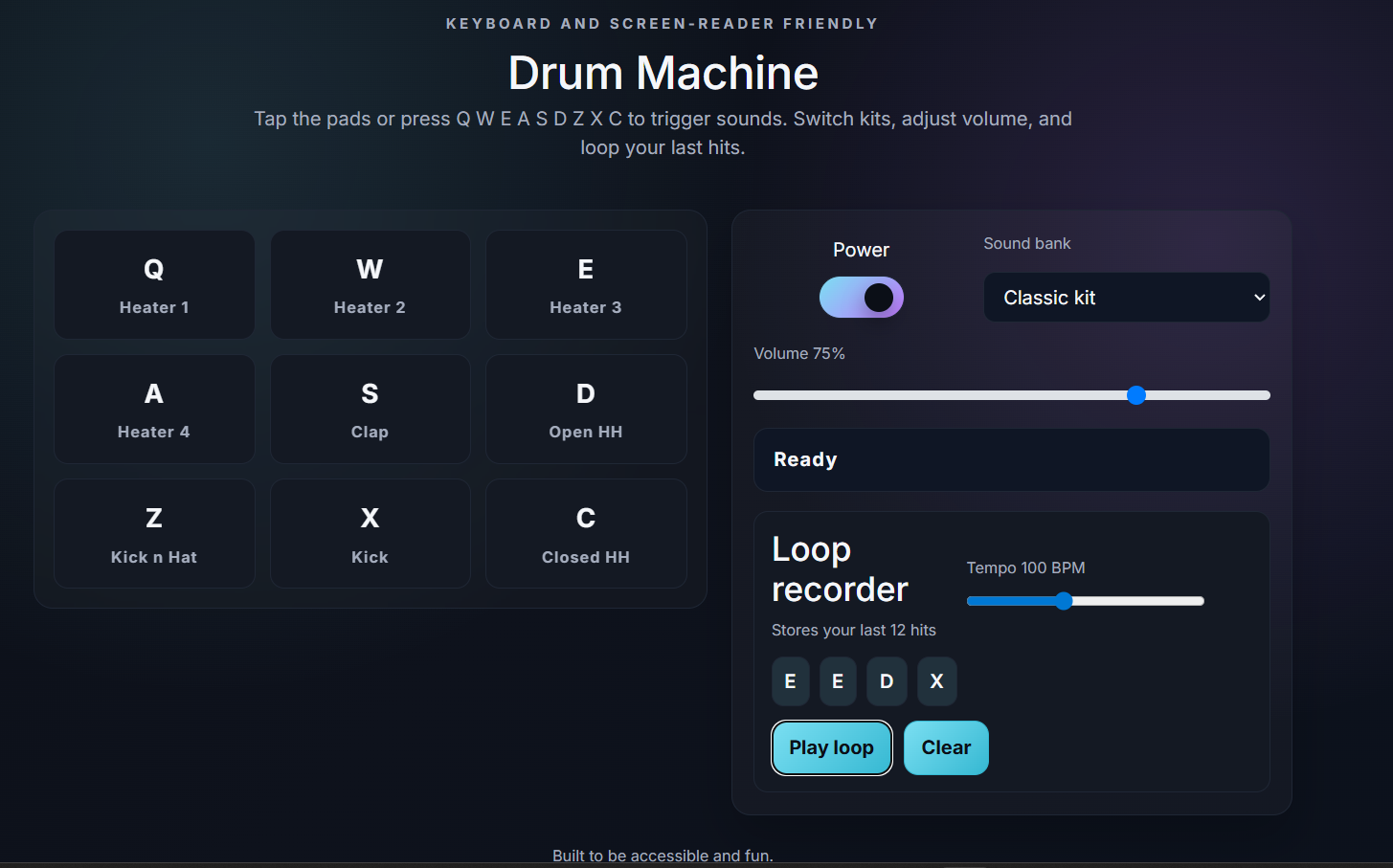
- Solution: Built a React based drum machine that can be fully controlled with the keyboard. It exposes semantic buttons, ARIA labels and live regions so screen readers announce pad hits, volume changes and loop state. The layout mirrors the Q W E A S D Z X C keys so the mental model matches the physical keyboard.
- Result: All interactions, from power and sound bank selection to pad hits and looping, are accessible without a mouse. In informal testing it reduced the time my friend needed to set up a practice loop from about one minute in a traditional DAW to under 15 seconds in the browser.
Introduction
This project started as a small experiment to make rhythm practice more approachable for a visually impaired friend. The goal was not to compete with full digital audio workstations but to provide a focused tool: tap pads, hear immediate feedback, record a loop and repeat the pattern without fighting the interface.
The drum machine is built as a single page React application using functional components and hooks. Pads are mapped to the keys Q W E A S D Z X C, with both click and key support. Each pad is rendered as a semantic button element with ARIA labels and a visual active state for sighted users. A top level status region announces the last pad hit, power changes and loop actions so NVDA and VoiceOver users can follow what is happening.
- Two sound banks, a classic kit and an ambient kit, can be switched from a select element that is accessible to both keyboard and screen reader users.
- A power toggle, volume slider and loop recorder sit in a side panel, all wired to the same accessible state model so they can be controlled by tabbing and arrow keys.
- The application is front end only, built with Create React App and bundled by react-scripts, which makes it easy to host as a static site.
Demonstration
Accessibility and Features
The main focus was making sure the experience remains usable with only a keyboard and a screen reader. This required careful attention to semantics, focus order and announcements rather than just styling buttons to look like pads.
- All pads are keyboard operable and use ARIA labels plus a dedicated live region to announce the sound name so users confirm what they are triggering.
- The volume slider and tempo slider expose their values through accessible names, allowing screen reader users to fine tune levels without guessing.
- The loop recorder automatically stores the last 12 hits and can play them back at an adjustable tempo. Status messages such as “Loop started”, “Loop stopped” and “Loop cleared” are spoken out as they occur.
- The interface uses a high contrast theme and focus visible styling so keyboard focus is easy to track for users with low vision.
- In practice sessions the loop feature let my friend spend far more time repeating patterns than manually retriggering pads, which led to more consistent practice in shorter sessions.
Key Outcomes and Learnings
This project reinforced how much thought is required to make even a simple interface truly accessible. It also highlighted how small changes in feedback and control design can significantly affect how quickly someone can start practicing.
- Gained hands on experience with ARIA roles, live regions and focus management to support screen readers in a reactive UI.
- Designed a state model that keeps visual, audio and accessibility feedback in sync for pads, power, sound banks, volume and loops.
- Used React testing utilities to verify basic behavior such as pad triggers, power toggling and loop actions without relying on manual clicking.
- Validated that small, focused tools can meaningfully lower the friction for visually impaired users who want to explore music and rhythm.